QuickCal
Add events to Google Calendar instantly from anywhere on the web.
QuickCal is a Chrome extension that lets you add events to your Google Calendar in seconds, from anywhere on the web. It recognizes dates and times in natural language, so you can create events with just a few clicks.
Perfect for students, professionals, and anyone who wants to stay organized without leaving their workflow.
⚡ Instant Event Creation
Add events to Google Calendar from any page with a right-click or popup.
🧠 Smart Date & Time Parsing
Understands natural language like "Lunch with Alex tomorrow at 1pm".
🎨 Minimal, Fast UI
Clean popup interface for quick event entry and confirmation.
🔒 Privacy-Friendly
No tracking, no ads, and open source code for full transparency.
👥 Multi-Account Support
Works with multiple Google accounts seamlessly.
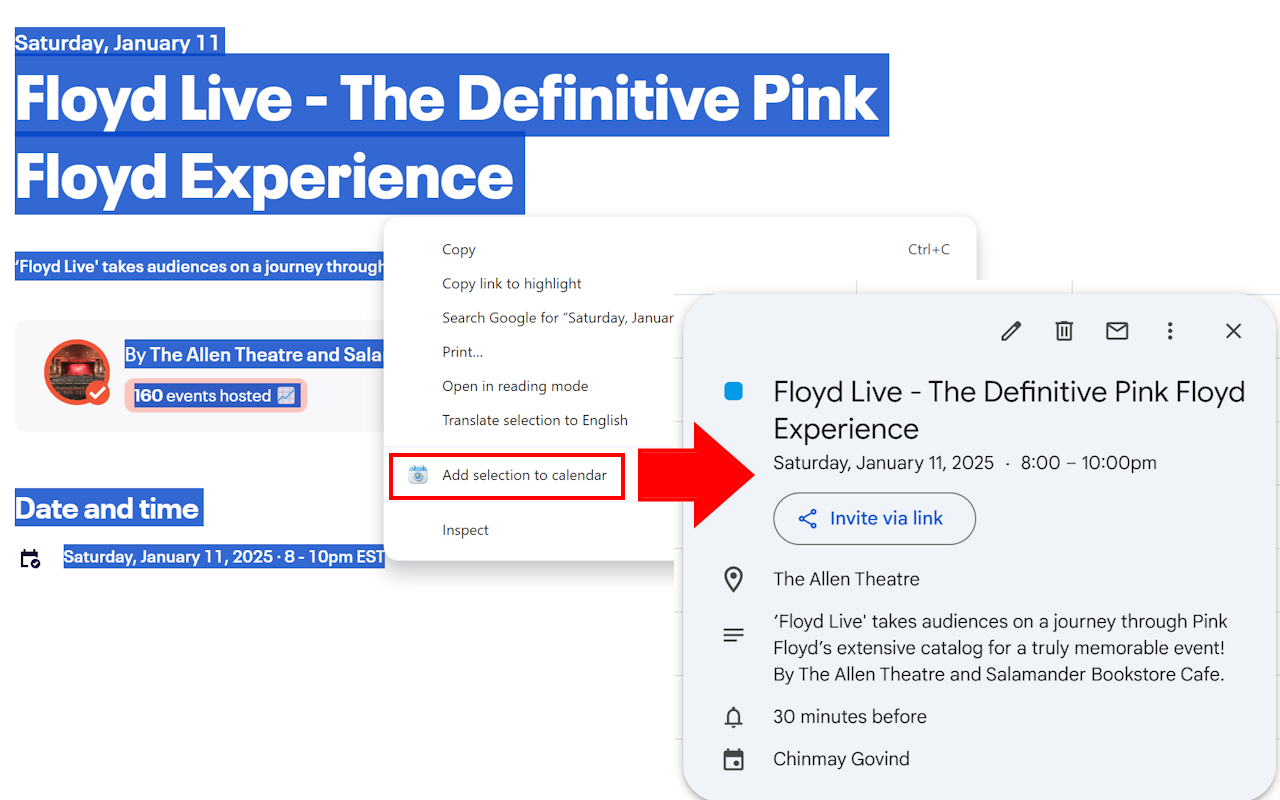
- Highlight any text on a webpage that represents an event description.
- Right click the text and click the "Add to Calendar" option in the toolbar.
- QuickCal will automatically detect the event details and prompt you to confirm.
Powered by Gemini AI for natural language event parsing.